Trending
 Sakunth
 6 min read
July 9, 2026 | 6:11 PM
AI works on guesswork, but your prompts shouldn't. Eliminate fluff by mastering advanced strategies like chain-of-thought, expert simulation, and structural delimiters for perfect outputs.
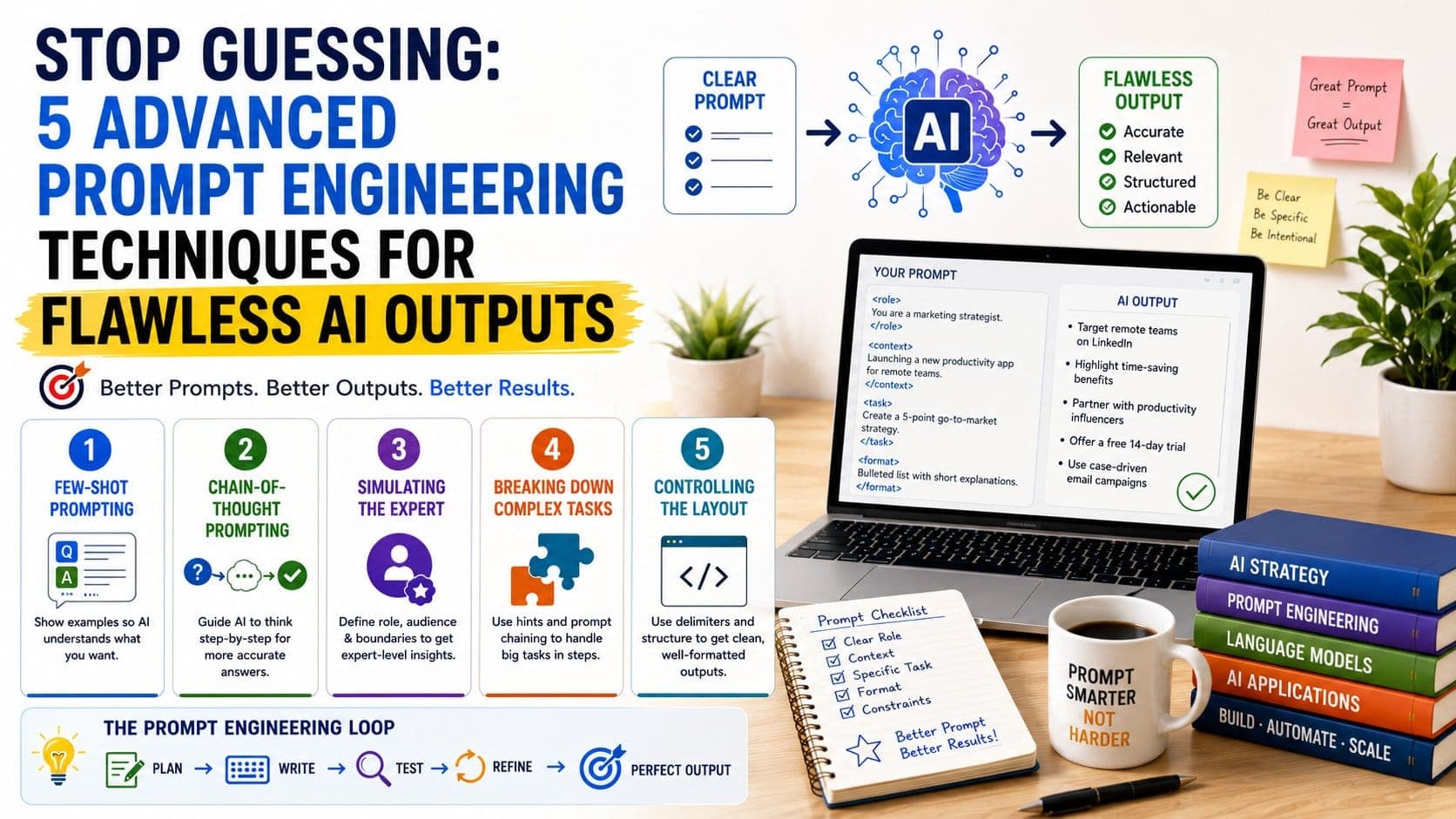
Prompt engineering is the language of AI; this is how you talk to an AI model so that it generates good outputs instead of plain fluff. Without a good prompt, you cannot get a good output, and even if you get an output, you will have to tweak it again and again, which can lead to a lot of time and tokens wasted. When you know exactly what you want, you need to translate it into a clear set of instructions to be read by AI so that it can produce an efficient output. Since AI works on guesses, when you give it a good prompt, it no longer uses guesswork to generate an output.
Here are 5 Advanced Prompt Engineering Techniques for Flawless AI Outputs:
AI cannot produce a good output if you do not give it a good prompt or teach it how to produce an output that you want from it. The one thing that you can try is to show AI how to derive the output that you want and not just tell it to produce that output. This is called Few-Shot Prompting.
You sometimes need to give an example to AI to help it produce an efficient output; for example, instead of just asking it to solve a particular problem, help it understand how to solve that problem with the help of an example. You can give two to three examples to the tool and ask it to produce the output in the same way.
AI works on guesses, so instead of thinking through a problem, it tries to guess the very next word in a sentence, which is a very different way of processing the output. AI can trip over complex math, logic puzzles, or nuanced business data. When you work through a Chain-of-Thought Prompting, it forces the AI to slow down, break the problem into pieces, and show its work before giving a final answer.
If you force AI to think logically and step by step, then you will drastically reduce the problems and errors that it may run through while generating an output. To force the step-by-step logic, include a direct command like "Think step-by-step before arriving at your final answer" or "Show your calculations and reasoning in a bulleted list before writing the conclusion."
When the AI lays out the foundation of its logic first, the final answer becomes significantly more accurate.
You can always ask an AI to mimic an expert, but giving it just a one-line prompt can never help you to get the depth of expert knowledge. To get highly specialized outputs, you need to create strict boundaries and specific constraints that mimic a real-world professional domain.
Instead of a generic persona, build a detailed framework of what the expert knows, who they are talking to, and what they are forbidden to do.
If you ask an AI to write a 2,000-word comprehensive guide all at once, the output will likely become shallow or lose track of the main point halfway through. Advanced prompt engineers use two techniques to handle massive tasks:
This means feeding specific anchors or keywords into the prompt to guide the AI’s focus. For example: "Write a paragraph about remote work, specifically focusing on the psychological impact of isolation."
Instead of asking for a finished product in one go, break the project into smaller, hyper-focused steps.
By treating the process like an assembly line, the quality remains incredibly high across the entire project.
When you ask AI to generate an entire article in one go, it might not go into detail and give you an over-the-surface article that is very generic and has a lot of fluff. Similarly, if you ask AI to summarise a very long article, then it can get confused about the output that you have pasted into the chat box.
To fix this, use delimiters. Delimiters are special characters or structural markers—like markdown headers (##), XML tags (<text></text>), brackets ([ ]), or triple quotes (""")—that cleanly separate your commands from the raw data.
Using clear tags makes it incredibly easy for the AI's parser to understand exactly what it needs to analyze, resulting in flawless layouts every time.
Prompt engineering is a very long process, and you cannot get it right at one go because you need to study the process in detail to understand the thinking of an AI model. When your prompt is strong, your output becomes better in quality, and you get exactly what you wanted to generate.
If your prompt starts off strong but the output begins to drift or lower in quality, use these quick troubleshooting fixes:
When you know how to talk to an AI model, you are immediately able to generate outputs that do not need changes again and again. Your prompt should be detailed and should be followed by examples. If your output is confusing to generate, you can also use special characters like brackets to separate different instructions so that the AI can understand everything clearly and generate the exact output that you need in one go.