Complete Full Stack Developer Roadmap for B.Tech & BCA Aspirants

user iconSakunthuser time6 min read

July 8, 2026 | 4:08 PM

AI can code, but it can't build ecosystems. Stand out to recruiters with this 9-month roadmap covering frontend, backend, databases, and AI-driven workflows tailored for B.Tech and BCA students.
Complete Full Stack Developer Roadmap for B.Tech & BCA Aspirants

Recruiters actively look for developers who can build an application from scratch. If you are an engineer who has a mountain of knowledge about user interface, knows how to manage databases, and deploy code independently, then you are on the radar of every recruiter out there. If you are a college student, your must-have skill should be becoming a full-stack developer because it is what makes you stand out among your peers and from the hundreds of resumes on the HR desk. 

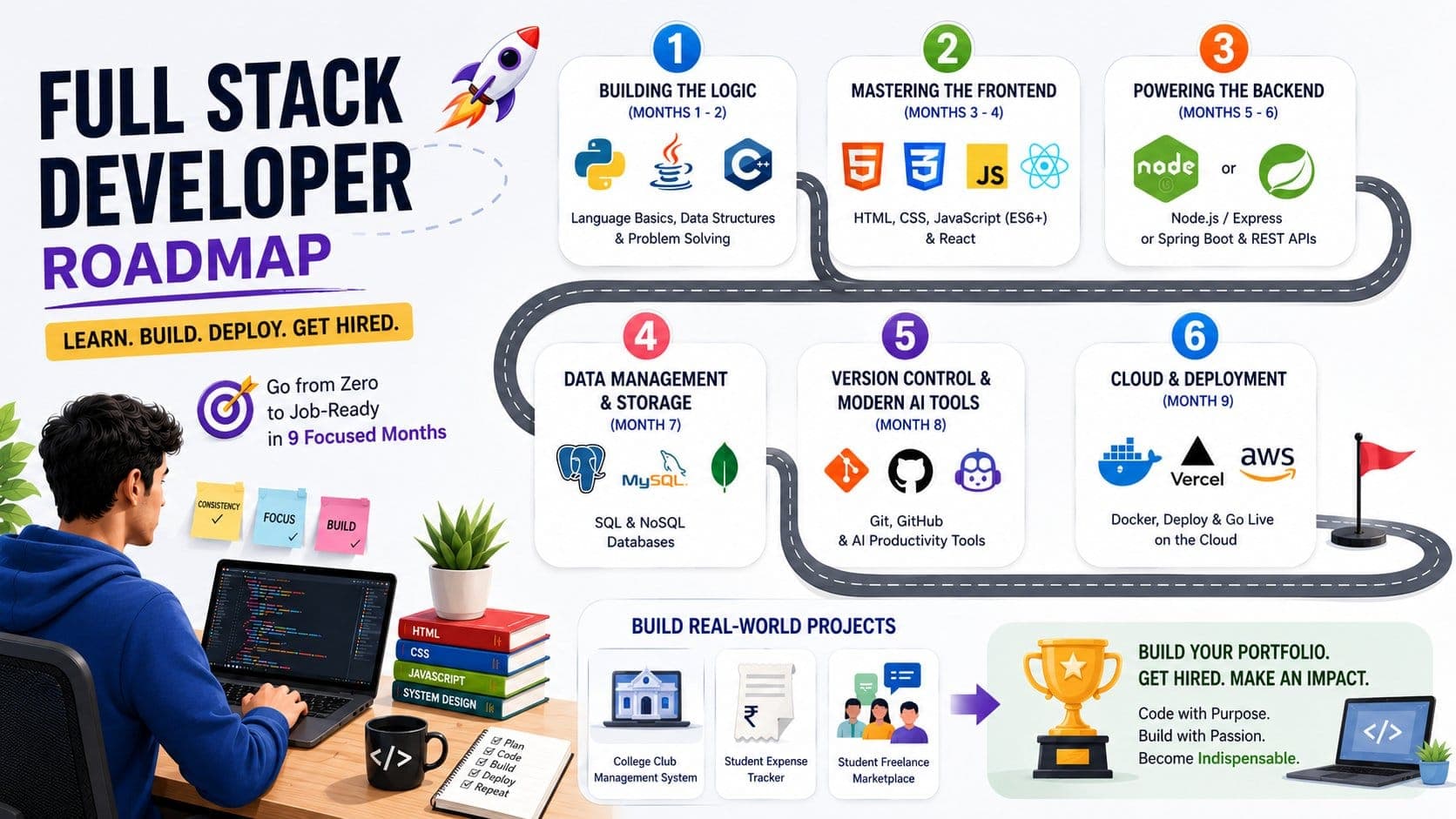
If you are a BTech student, then you already have a background in hardware and software integration and mathematics that you can use as a leverage to excel in backend architecture and optimization. On the other hand, if you are studying BCA, then your best forte is your native familiarity with software development cycles and web applications. Here is a roadmap that will help you become a full stack developer in exactly 9 months. 

Phase 1: Building the Logic (Months 1 - 2)

Before diving into the actual programming, you need to build the foundation so that you do not struggle with something basic after you start coding. 

Mastering Language Fundamentals (C++, Java, or Python)

Mastering one language is enough to start your journey as a software developer. If you try to learn all three languages, then you will end up being confused. 

  • Java/C++: Excellent if your primary goal is cracking on-campus technical hiring assessments.
  • Python: Great if you want a softer learning curve or plan to pivot later into AI/Data engineering.

Basic Data Structures and Problem Solving

Understanding the nitty-gritty details of data structures should not be on your bucket list just yet, but you need to understand how data is organised:

  • Core Concepts: Arrays, Strings, Linked Lists, Stacks, Queues, and Recursion.
  • Action Item: Solve 50 to 100 easy-to-medium problems on platforms like LeetCode or GeeksforGeeks to build muscle memory.

Phase 2: Mastering the Frontend (Months 3 - 4)

After working on the foundations, your next step should be mastering the frontend, where the user will basically see your work. 

Web Essentials: HTML5 & CSS3

  • HTML5: Learn how to structure a webpage layout cleanly using semantic tags (like <header>, <article>, and <footer>).
  • CSS3: Focus heavily on Flexbox and CSS Grid for creating responsive layouts that adapt perfectly to both mobile screens and desktop monitors. Skip complex, raw styling early on and learn a utility framework like Tailwind CSS to build modern UIs rapidly.

Dynamic Interactions: JavaScript (ES6+)

JavaScript is the foundation that every developer should master: 

  • DOM manipulation (changing web elements dynamically)
  • Asynchronous programming (Promises and Async/Await)
  • Fetch API (how your frontend talks to external servers)

Picking a UI Framework: React vs. Angular

Once your JavaScript foundations are rock solid, adopt a component-based library to build scalable user interfaces.

  • React: Highly recommended for beginners due to its massive job market, large community, and rich ecosystem.
  • Angular: A robust framework preferred by many large enterprises, but comes with a steeper learning curve (requires learning TypeScript first).

Phase 3: Powering the Backend (Months 5 - 6)

After the frontend, you should work on the backend where all the different mechanics of the user interface are tied down. 

Server-Side Runtime: Node.js or Java Spring Boot

  • Node.js ecosystem: If you chose React for the frontend, picking Node.js (with Express.js) allows you to write JavaScript across your entire stack. This unified stack is highly practical for college timelines.
  • Java Spring Boot ecosystem: If your university heavily emphasizes Java, choosing Spring Boot makes you highly attractive to traditional enterprises and banking tech sectors.

Creating Connections: Building RESTful APIs

An API (Application Programming Interface) acts as a bridge between your frontend and backend. Learn how to design clean API endpoints using standard HTTP methods:

  • GET (Fetching data)
  • POST (Creating data)
  • PUT (Updating data)
  • DELETE (Removing data)

Phase 4: Data Management & Storage (Month 7)

Now, after all the frontend and backend shenanigans, you need to focus on the storage of user data; for example, storing their profile. 

Structured Data: SQL (MySQL / PostgreSQL)

Relational databases organize data into rigid tables with strict links between them.

  • What to learn: Writing queries, joining multiple tables, and handling database normalization. Perfect for structured projects like an E-commerce platform or banking application.

Unstructured Data: NoSQL (MongoDB)

Non-relational databases store data flexibly as JSON-like documents.

  • What to learn: Schema design and indexing. This is highly popular when building JavaScript-focused application stacks.

Phase 5: Version Control & Modern AI Tools (Month 8)

Recruiters now do not look for just software engineers, but they look for people who can work with modern AI tools and integrate them into their workflows. 

Tracking Code: Git & GitHub

  • Git: A local tool to track historical changes in your code so you can safely experiment without breaking working features.
  • GitHub: A cloud platform to store your repositories online, collaborate on group college projects, and display your portfolio to recruiters.

Speeding Up Workflows: GitHub Copilot & Cursor AI

AI cannot replace you if you understand how to integrate it into your daily activities and make your productivity much faster by using tools like GitHub Copilot & Cursor AI. If you can produce code within a fraction of a second, then you will be much needed in any company. 

Phase 6: Cloud & Deployment (Month 9)

The worst thing that you can do is code and build everything just to store it on your local computer and not publish it for the recruiter.

Containerization Basics: Docker

Docker packages your code, backend dependencies, and runtime environment into a single, uniform package called a "container." This ensures your application runs identically on your laptop, your teammate’s MacBook, or a cloud server.

Going Live: Cloud Deployments

  • Frontend: Deploy your user interfaces seamlessly using automated, free platforms like Vercel or Netlify.
  • Backend & Database: Host your backend code and databases live using platforms like Render, Railway, or AWS (Amazon Web Services).

Portfolio & Campus Placement Prep

Your last step towards becoming a full-stack developer is to make a Portfolio that stands out among the crowd. You should be able to solve real problems with your project instead of making monotonous projects that are available everywhere:

Capstone Projects: Building Real-World Web Apps

Everyone can build a simple calculation project, but to showcase your skills and knowledge, you need to make unique projects like:

  • A localized college club management system with real-time notifications.
  • An automated student expense tracker that parses digital receipts.
  • A freelance marketplace tailored directly to students on your campus.

Because of AI, everyone can code, but not everyone can become a full-stack developer with a mountain of knowledge and a huge portfolio to showcase all the things that they have learnt. To become an efficient developer, you need to follow a specific schedule like above and be confident in your skills by showcasing them through a well-developed portfolio. 
BEGINNER30 DAYS6 HRS / WEEK

AI for Campus

AI for Campus — Your AI Edge in College & Beyond. Powered by Claude by Anthropic · 30 Days · All Streams Welcome. A first-of-its-kind AI literacy programme for students entering graduation and post-graduation. This is not a theoretical course — every session puts Claude...

BEGINNER TO INTERMEDIATE3 MONTHS2 HRS / WEEK₹1,501 OFF

Claude AI for Shopify

This bootcamp is for D2C founders, e-commerce entrepreneurs, and students targeting retail tech careers. Build and grow a Shopify store end-to-end using Claude as your content engine, ops assistant, and analytics co-pilot. Go beyond basic tutorials — integrate AI into r...

₹5,500₹3,999
Enroll Now →
BEGINNER TO INTERMEDIATE3 MONTHS2 HRS / WEEK₹1,501 OFF

Claude AI for Business Analytics

This bootcamp trains analysts, finance pros, ops managers, and consultants to turn data into decisions using Claude as an AI co-pilot. Participants learn to clean data, write SQL, build dashboards, interpret KPIs, and deliver executive insights — no data science degree ...

₹5,500₹3,999
Enroll Now →
BEGINNER TO INTERMEDIATE3 MONTHS2 HRS / WEEK₹1,501 OFF

Claude AI for Content Creators

This bootcamp is built for content creators, copywriters, social media leads, and aspiring writers who want to use AI as a creative co-pilot — not a ghostwriter. In a world where content is the currency of influence, this programme ensures you produce more, faster, with...

₹5,500₹3,999
Enroll Now →
BEGINNER TO INTERMEDIATE3 MONTHS2 HRS / WEEK₹1,501 OFF

Claude AI for Digital Marketing

This bootcamp is built for aspiring marketers, growth hackers, and performance specialists. In a world where content velocity wins, this programme ensures you enter the industry with a real competitive advantage — the ability to plan, create, and optimise full marketing...

₹5,500₹3,999
Enroll Now →
BEGINNER TO INTERMEDIATE3 MONTHS2 HRS / WEEK₹1,501 OFF

Claude AI for Vibe Coding

This bootcamp is built for non-coders, first-time builders, and anyone who has ever had an idea for a product but couldn't code it. Using natural language and Claude's AI capabilities, you will ship real apps, websites, and automations — without memorising syntax or sit...

₹5,500₹3,999
Enroll Now →