Trending
 Rupsa Chakrabarti
 6 min read
August 4, 2026 | 6:23 PM
Clean up your pull requests with Claude. Use our 4-pass review framework and battle-tested prompts to catch hidden bugs, fix security gaps, and get your code merged faster with zero PR friction.
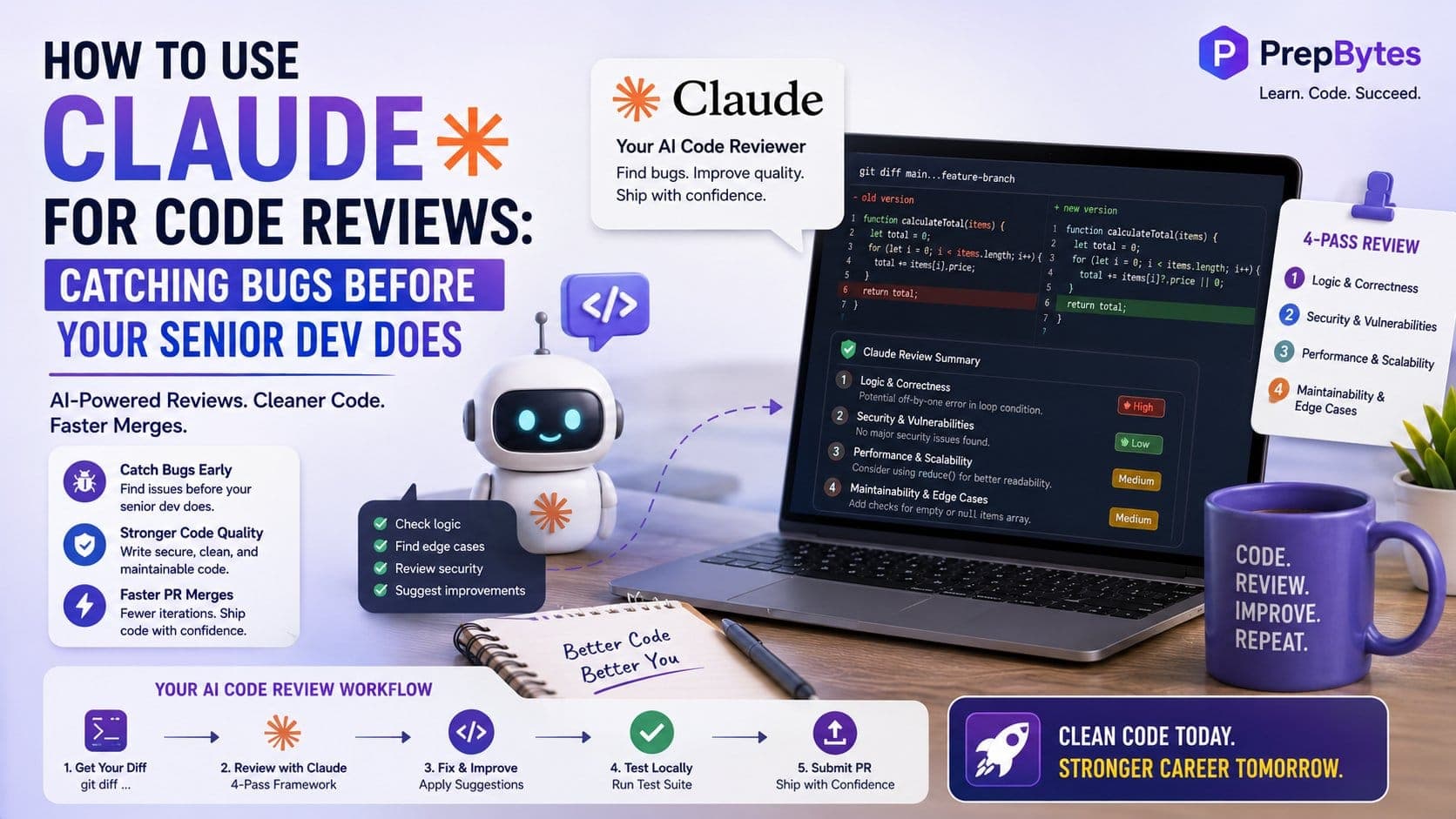
Running a manual code review can feel daunting because of how massive a pull request you have to compile. Even if you gather around a good PR, you may still find more comments from your senior engineer, which is not a fun experience. The ultimate solution for this problem is to use an AI code reviewer. You can use an AI tool to oversee your code before presenting it to senior management to help it become spotless.
By using Claude as your personal code reviewer, you can catch edge cases, security vulnerabilities, and subtle bugs ahead of time. Here is how to use Claude for code reviews:
When you use humans to catch errors in your code, you are opening room for mistakes. Other than that, it requires a high level of focus and a lot of time to review code and catch human mistakes. When you individually point out variable naming issues, missing type definitions, or missing error handlers, the entire review process slows down.
Using Claude for a "pre-flight" review changes this dynamic completely:
Prompt engineering is the basics when you require high-level output. You cannot simply put your code in Claude and expect it to run a review and give you an extensive output to rely on.
To get actionable feedback, you need to provide context. Think of this as the Context Triangle:
Don’t copy and paste entire raw files if you only changed twenty lines. Give Claude the exact diff so it knows what was added, deleted, or updated. You can get a clean diff from your terminal:
Bash
git diff main...feature-branch > pr_changes.patch
Every codebase has its own norms. If your team prefers async/await over promises, or functional components over class components, tell Claude. Better yet, if you use a CLAUDE.md file in your repository, share those guidelines upfront.
Explain what the code is supposed to do. A function might be syntactically perfect, but if it was supposed to calculate a 10% discount and it calculates 20% instead, only contextual instructions will help Claude spot that logic error.
Instead of expecting an AI tool to go through the whole code at once, you need to guide it through a structured review process that will give you a good output.
In this step, you want Claude to hunt for logical flaws, state mutations, off-by-one errors, and unexpected infinite loops.
This pass ensures you aren't accidentally opening doorframes for security breaches, leakages, or unauthenticated access.
Code that works fast with 10 test records in local development might completely crash when handling 100,000 database rows in production.
Finally, check for unhandled promises, null/undefined safety errors, unclear variable names, and missing fallback states.
Here are three ready-to-use prompts you can copy and paste directly into Claude during your next review pass.
Role: You are a strict Senior Staff Engineer conducting a pull request review.
Task: Review the attached code diff against the business requirements below.
Instructions:
Requirements: [Paste business requirements here]
Code Diff: [Paste git diff here]
Task: Act as a QA Engineer trying to break this code. List the top 5 ways this code could crash, produce wrong data, or fail in a production environment (e.g., network timeouts, malformed JSON inputs, rate limits, concurrent requests).
Code: [Paste code here]
Task: Review the following diff for bugs. To avoid noise, only point out bugs that you have greater than 80% confidence in. If the code looks clean and bug-free, respond with "No critical bugs found."
Diff: [Paste diff here]
Manual copy-pasting is fine for quick checks, but integrating Claude directly into your development workflow saves even more time.
If you use command-line AI tools like Claude, you can run a pre-commit check directly in your terminal before pushing your branch:
Bash
# Review staged changes directly from your terminal
git diff --cached | claude "Review these staged changes for potential bugs and missing error handling."
You can also set up automated GitHub Actions that trigger Claude whenever a PR is created. Claude can run in the background and leave comments directly on your pull request lines, highlighting potential bugs before your teammates open the PR notification.
No AI tool can replace a human, so here are a few cases where Claude may take a back foot and a human reviewer wins.
| Area | Claude's Capability | Human Senior Dev Capability |
| Syntax & Type Safety | Outstanding | Time-consuming |
| Catching Edge Cases | Outstanding | Easy to overlook |
| System Architecture | Good with context | Deep institutional knowledge |
| Business Context | Limited to prompt | Knows hidden team goals |
| Team Conventions | Needs clear rules | Intuitive understanding |
Before submitting a review request to any AI tool on your next PR, you need to have the following things ready:
By making Claude your first reviewer, you'll ship cleaner code, reduce PR turnaround times, and build a reputation for delivering rock-solid work.