Trending
 Sakunth
 3 min read
July 22, 2026 | 4:51 PM
Typing prompts isn't enough to get hired. Turn your local Claude outputs into a live, secure web app. Follow this step-by-step guide to structure, host, and launch your AI project for free.
Qualifying your college semester or writing a clean code is no longer enough to get you a high-paying job. As Artificial Intelligence is taking over the tech industry, basic coding skills are becoming all the more irrelevant. The truth is, recruiters don’t care about college assignments and CGPA now; they value live working AI applications that can solve real-world problems and be useful to actual people.
Claude has emerged as one of the most powerful tools for generating complex software through simple instructions—also known as vibe coding. But having a prompt hidden in your computer folders would mean nothing to hiring managers. You need a live website URL to grab their attention. How exactly? Simply by following this guide—pick your first project made with Claude and turn it into an active web application.
Launching an app on your laptop feels awesome. You prompt Claude into generating a visually appealing webpage, and it works perfectly on your system. And the next thing you add to your resume is the “AI Developer” tag!
But here’s the catch—hundreds of other resumes may have the same skill and tag. So simply prompting an AI assistant doesn’t count as a unique skill anymore. Over 80% of professional coders already use AI tools on a daily basis. Anyone can write a prompt. What really sets you apart is turning that AI output into a real, secure website accessible to anyone on the internet.
Local AI projects typically miss out on the real tech skills that employers actually pay for:
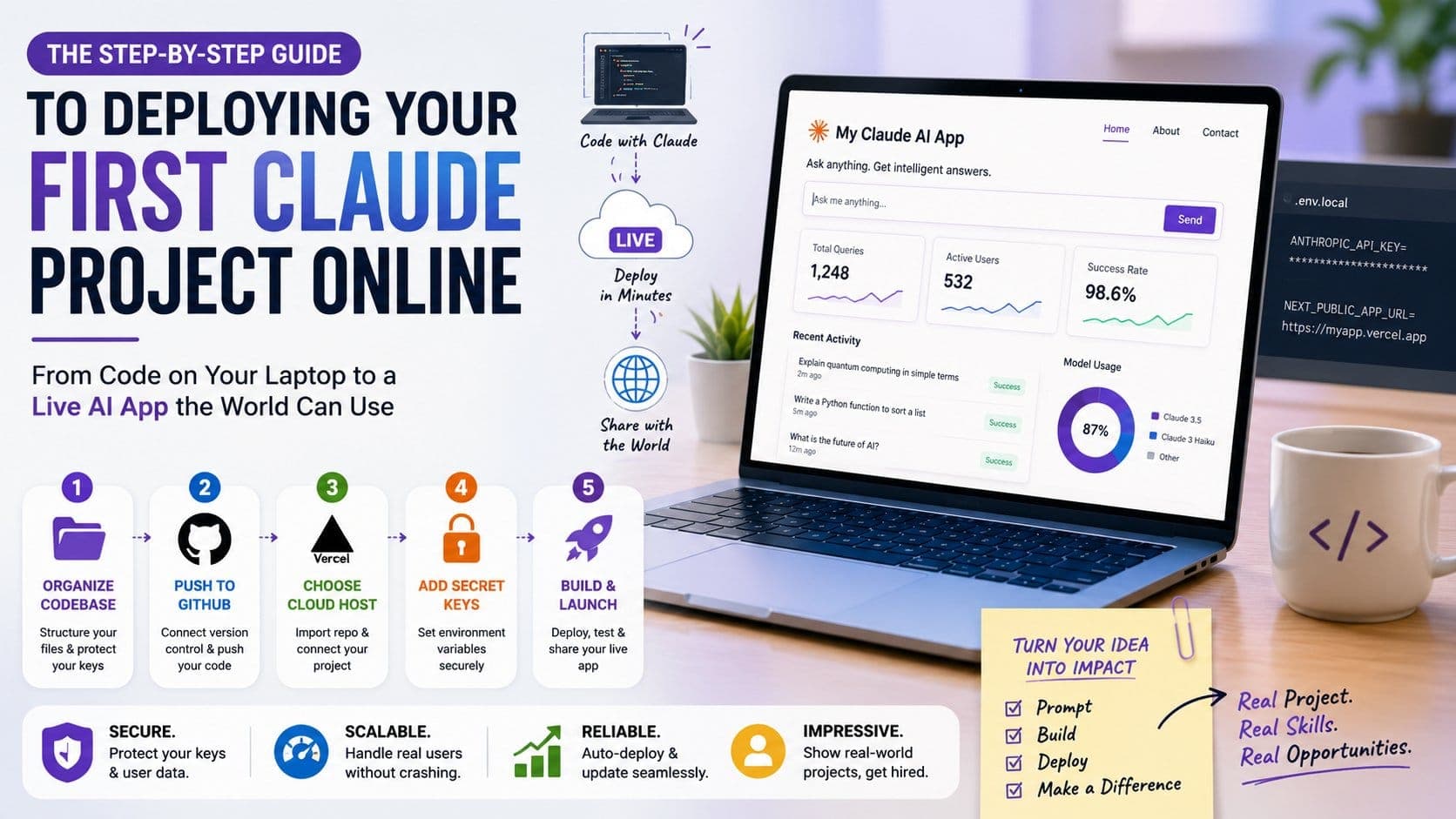
Here is a step-by-step guide to clean up your codebase, secure your secret keys, and make your first Claude project live on the web:
| Step | Core Action | Key Task & Command | Why It Matters |
| 1. Organize Codebase | Structure your files | Split code into /components, /app, and /lib. Keep keys in .env.local. | Prevents giant, buggy files and protects your API keys from web scrapers. |
| 2. Push to GitHub | Connect version control | git init git add . git commit -m "Initial commit" | Creates a cloud bridge for modern hosting platforms to pull code automatically. |
| 3. Choose Cloud Host | Connect Vercel or Netlify | Sign up via GitHub → Click "Add New Project" → Import repository. | Lets you deploy instantly without managing complex cloud servers or firewalls. |
| 4. Add Secret Keys | Set environment variables | In Vercel, add variable: ANTHROPIC_API_KEY = [Your API Key] | Allows your live site to safely use Claude without leaking keys to the public. |
| 5. Build & Launch | Deploy and test | Hit "Deploy" → Check browser console → Test queries → Share URL. | Turns your code into a live, secure https:// website to showcase on your portfolio. |
Still not sure how to get started? Skip the confusion and build real-world AI projects with the PrepBytes Claude AI for Vibe Coding Program, to impress recruiters. This course teaches you how to control Claude, give it the right context, and launch full, working AI apps directly onto the web rather than wasting time memorizing boring textbook theories.
Building your first online AI project completely changes the way you look at technology. You finally stop treating AI like a cheatsheet for homework and start using it to build actual software products. So, don’t keep your Claude projects hidden on your desktop—upload your code, safeguard your security keys, publish your app online, and show recruiters that you know how to build things for the real world.