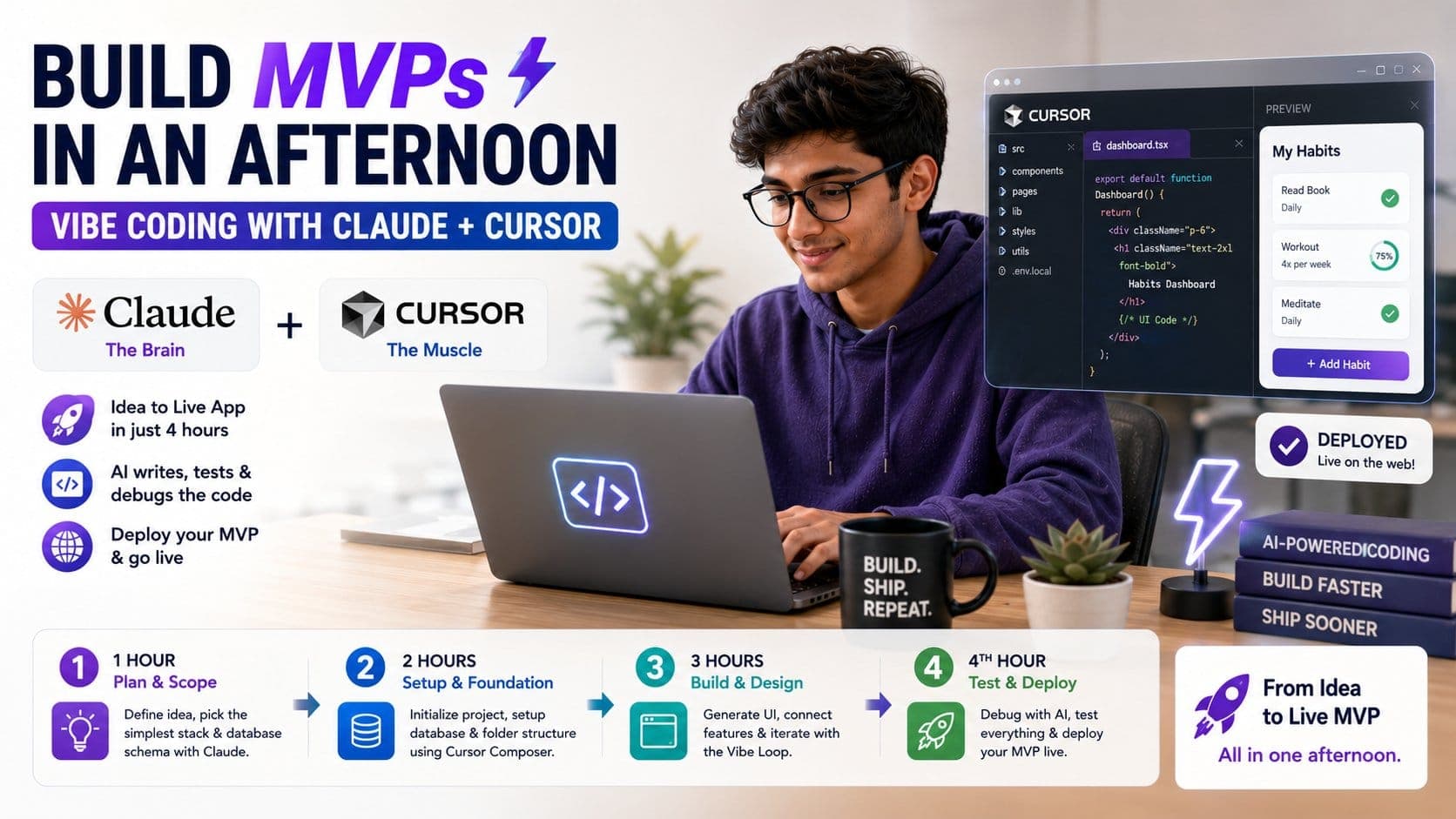
Coding is no longer about typing endlessly on a computer and staring at complex code, then running into a bug. Now, instead of manually writing code, debugging it, waiting for it to compile, and wasting your entire day, you can let AI do the labour for you. With the help of AI tools like Claude and Cursor, you can build an application in just 4 hours, plus showcase it in your portfolio and be the top candidate for a job. Vibe coding is all about speed and accuracy so that you get the best of both worlds plus prove your efficiency as a programmer.
Here is How Vibe Coding with Claude and Cursor allows you to build MVPs:
What is "Vibe Coding"?
Vibe coding is a shift in mindset that means you are moving away from manual labour and shifting towards directing the AI software to do the work for you. While traditionally most of the time was spent on manual labour and figuring out how to write the code instead of just writing the code and reviewing it later, it became a task to keep it up.
During vibe coding, you are not manually writing the code but handling AI software that will type and compile code for you, plus also debug when needed. You stop acting like a construction worker laying individual bricks and start acting like the architect directing a highly efficient robotic crew.
The Power Couple: Claude + Cursor
While there are many AI tools on the market, the combination of Claude and Cursor is the undisputed gold standard for rapid development.
- Claude (The Brain): Claude (specifically the Sonnet family) possesses an incredible grasp of complex programming logic, context retention, and human-like reasoning. It doesn’t just guess the next word; it understands how your database structure impacts your frontend components.
- Cursor (The Muscle): Cursor is a fork of VS Code, meaning it feels instantly familiar, but it has AI deeply integrated into its DNA.
- The Composer Feature (Cmd + I or Ctrl + I): This is the secret weapon. Instead of editing one file at a time, Cursor's Composer can write, modify, and delete code across ten different files simultaneously to implement a single feature.
The 4-Hour MVP Blueprint
To build an MVP product in a short amount of time, you need a structured timeline to be followed so that you do not waste any second on unwanted manual labour.
Hour 1: Architecture & Radical Scoping
The biggest threat to an afternoon MVP is scope creep.
- Open Claude and describe your app idea.
- Ask: "What is the absolute simplest tech stack and database schema to build this?" (A great default is Next.js, Tailwind CSS, and Supabase for your database/authentication).
- When you are short on time, instead of focusing on the unnecessary features and aesthetics, you should focus purely on the working of the application.
Hour 2: Setting the Foundation with Composer
Open Cursor, create an empty folder, and open the Composer window.
- Use the @ symbol to tag your folder and write:
"Initialize a new Next.js app in this directory using Tailwind CSS, App Router, and TypeScript. Set up a basic folder structure." - Once that’s generated, prompt Composer to create your database schema and connection files:
"Create the Supabase schema for our habits table and write a helper file to initialize the Supabase client." In under an hour, you have a fully structured, working backend architecture without writing a single line of database connection boilerplate.
Hour 3: Designing the UI & The "Vibe Loop"
Now, it’s time to make it look good and function smoothly.
- Iterative Design: You don't need to write CSS. Describe the layout you want: "Create a clean, modern dashboard. Use a card-based layout with a green and slate gray aesthetic. Make sure it is fully responsive on mobile."
- The Feedback Loop: Run your local server. If something looks slightly off, take a screenshot of your browser, paste it directly into Cursor, and say: "The spacing on these buttons is too tight, and the toggle switch is cut off. Fix this UI." Cursor will scan your files and adjust the styling in seconds.
Hour 4: Debugging & Going Live
At the end, you need to just clean up all your errors.
- If your terminal throws an error, don’t panic. Copy the error, press Cmd + L to open the chat, tag the @Terminal, and hit enter. Cursor will diagnose the bug and offer a one-click fix.
- Connect your GitHub repository to Vercel or Netlify.
- Hit "Deploy." Within minutes, your MVP is live on the internet, ready for real users.
Master the Art of Prompting in Cursor
To vibe code effectively, you need to know how to talk to your tools. Here are three rules of thumb:
- Talk Like a Manager, Not a Coder: Don’t say, "Write a function that maps over an array and filters out null values." Instead, say, "Filter out completed habits from the user's daily view so they only see pending tasks." Let the AI figure out the JavaScript.
- Use Context Tags Liberally: Use @Files to point the cursor to the exact component you want to change, and @Web to let it search the internet for the absolute latest documentation of a library you want to install.
- Feed It the Logs: When things break, don't try to explain the issue. Just feed the raw console logs directly to the AI.
Avoid the Pitfalls: How to Keep the Vibe Clean
Vibe coding is all about speed; however, when you are incredibly fast, things can look messy, so you need to keep these pointers in mind:
- Commit Your Code Constantly: AI changes multiple files at once, so you can run into an error almost suddenly, so you need to make a Git commit every time a feature works. If the AI takes the code down a weird rabbit hole, you can easily revert to your last working commit.
- Don't Let the AI "Over-Engineer": If you ask the AI to add a simple email notification, it might try to install three new npm packages and set up a complex queue system. Keep it grounded. Remind it: "Keep the code as simple and lightweight as possible."
- Take the Wheel When Stuck: If Cursor tries to fix the same bug three times and fails, step in. Read the code. Often, the AI is missing a simple conceptual link that you, the human director, can spot instantly.
Gone are the days when you had to spend month after month coding so you could understand the basics; now you no longer need to know coding to develop software that is simple and easy to land a job. With Claude and Cursor as your assistants, you can become the next software developer without even needing a degree.
 Trending
 Sakunth
 6 min read