Trending
 Sakunth
 5 min read
July 28, 2026 | 6:02 PM
Ditch outdated SQL text queries. Build an AI search feature using vector embeddings and databases like Pinecone to understand user intent, deliver smart results, and impress modern tech recruiters.
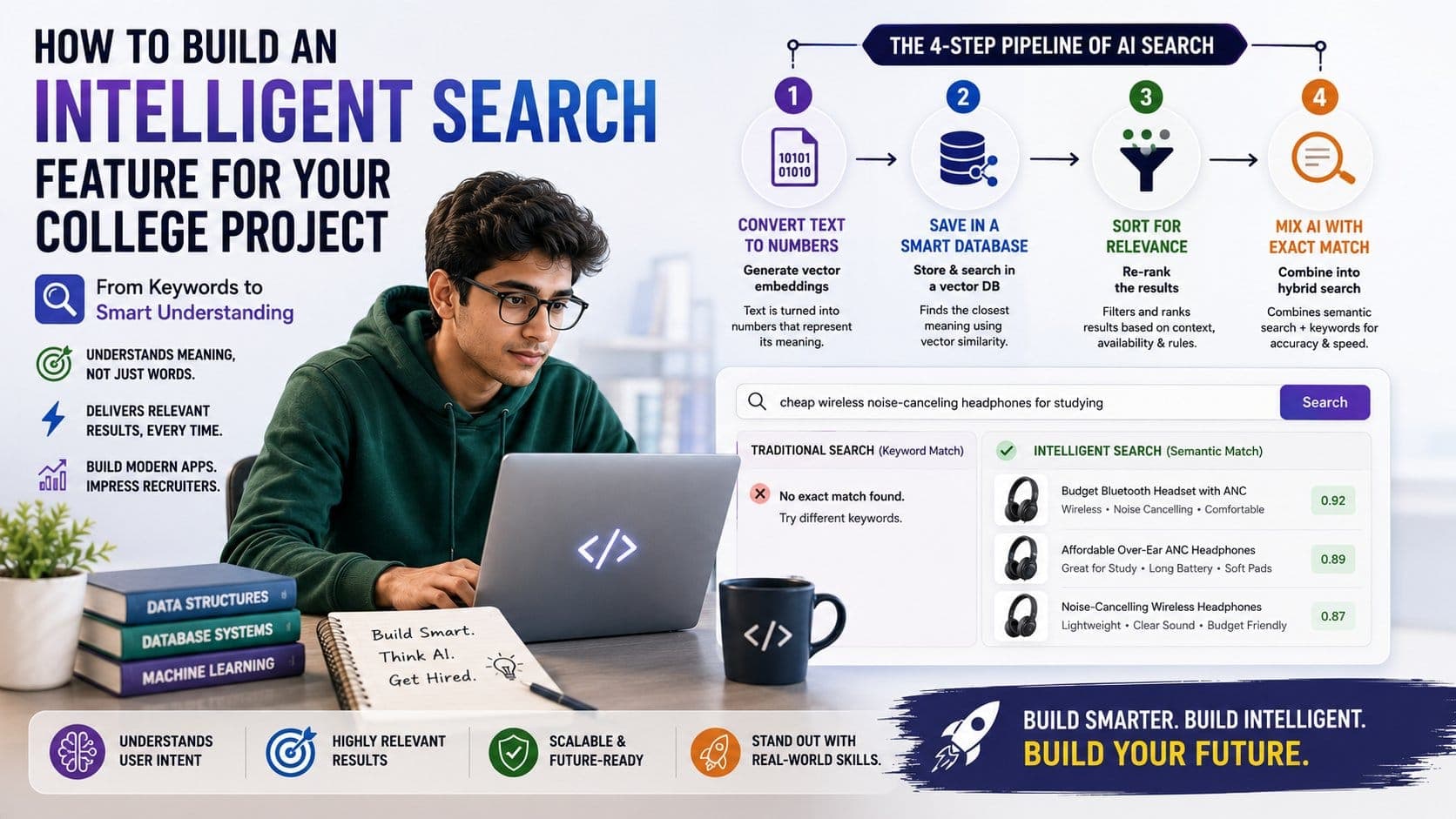
If you are still counting on standard SQL queries or text matching to complete your final-year college project, you are probably building an outdated digital archive, not a modern application. Traditional database searches look for exact matching words. Let’s say someone enters "cheap wireless noise-canceling headphones for studying" into the search bar—a standard database query fails to show results. Why? Because your product is listed as "Budget Bluetooth Headset with ANC”, so the search turns up empty as the exact words don’t match. This obviously forces your users to drop the search and leave. Your college grades don’t improve beyond a 8.5 CGPA, and what’s worse is that you miss out on learning real-world tech skills.
In today’s AI era, recruiters don’t care about your degree and college grades, or how well you can memorize formulas. What they really care about is whether you can build smart systems that understand what users actually want.
Here’s a complete guide on how to replace outdated search queries with an intelligent AI-powered search feature that actually gets you hired!
Traditional search systems look for matching letters rather than understanding the search intent. A small typo, a synonym, or even a casual question that doesn’t match the listed product ends up giving you zero search results. Almost all the leading software companies today have turned to intelligent search systems that understand the human language. However, many colleges still teach old-school search methods that rely on matching texts.
If you are aiming for a high-paying job in the software industry, it's high time you learn these modern search skills on your own.
Smart searches rely on semantic search—understanding the meaning behind a query instead of matching letters. It converts text into numerical representations known as vector embeddings. So, when a user searches for a product, the application doesn’t look for identical words; it compares the ideas closest to what the user is actually looking for.
The thought of building an intelligent search tool might sound complicated initially, but here’s a simple step-by-step pipeline explaining how raw text converts into smart search results:
| Step | Action | What It Means | How It Works |
| 1. Convert Text to Numbers | Generate Vector Embeddings | Computers don't read words—they read math. An AI model turns text into a long list of numbers that represent its meaning. | Software converts a product name or description into a mathematical code so the AI can compare ideas, not just words. |
| 2. Save in a Smart Database | Store & Search in a Vector DB | Standard databases struggle with complex math, so you store these number codes in specialized databases like Pinecone or Milvus. | When a user types a search, the system converts their query into numbers and finds the items whose codes are closest in math distance. |
| 3. Sort for Relevance | Re-Rank the Results | Math matching finds related items, but it doesn't know about business rules like store inventory, prices, or user location. | The system takes the top 10 closest matches and runs them through a light AI check to filter out unavailable items and prioritize the best fit. |
| 4. Mix AI with Exact Match | Combine into Hybrid Search | AI search is great for understanding concepts, but it can miss hyper-specific codes like an exact product model number (e.g., "iPhone 15 Pro Max"). | Hybrid Search combines old-school exact keyword matching with smart AI search to deliver fast, highly accurate results every time. |
Learning to set up vector databases and link API calls manually is a great start. But here’s the truth—the current tech industry has moved beyond typing code line-by-line. In 2026, the most valuable developers are not the ones who can memorize and type boring syntax. They are the system architects who know exactly how to command AI tools to assemble full-stack apps in days, not months, and seamlessly launch them online. If you’re still struggling to connect your website’s design to an AI system, then you’re clearly missing the mark.
To bridge this gap between standard classroom assignments and real-world tech jobs, enroll in the PrepBytes Claude AI for Vibe Coding Program. Beyond textbook theories, the course trains you on how to direct smart AI agents, automate full-stack deployments, and build advanced, intelligent search engines at lightning speed.
The table below presents a complete breakdown of what a smart search code actually does behind the scenes. Instead of searching for exact words, this single backend feature turns a search query into math, scans a smart database, and shares the best matches.
| Part of Code | What It Does | Why It Matters |
Setup & Connections import { Pinecone, OpenAI }... | Connects your code to OpenAI (for translation into math) and Pinecone (the smart vector database) using secret security keys. | Ensures your application can safely talk to cloud AI services. |
Step 1: Convert to Math openai.embeddings.create(...) | Takes the user's typed search query (e.g., "quiet study headphones") and asks OpenAI to translate it into a numerical code. | Converts human concepts into math so the system understands meaning, not just letters. |
Step 2: Find Best Matches pinecone.Index().query(...) | Sends those numbers to Pinecone and asks for the top 5 items in your database that have the closest matching meaning. | Instantly finds relevant products or content without needing exact keyword matches. |
Step 3: Send Clean Results searchResults.matches.map(...) | Cleans up the raw data from the database and extracts just the title, description, and accuracy score. | Sends a neat, structured list back to your website's front end so the user can see their results. |
Thus, by adding a simple endpoint like this, you can upgrade your college project from a basic classroom assignment to an intelligent web application that actually impresses recruiters.
If you want to stand out, stop building boring class projects. Build apps that have actual brainpower built into them. Add smart AI search that understands meaning, build automated backup systems for when the AI makes mistakes, and launch your project on a real, live web server. Put that working website link right at the top of your resume.